To sign up for an account, go to http://members.wellsense.org. You'll need to enter your email address and choose a password.
Your password must contain:
- Lowercase letter
- Uppercase letter
- At least 8 characters
- A number
- A special character
You'll also need the member ID found on a WellSense member ID card for any members you will need access for. If you don't have a member ID card, please call Member Service for assistance.
If you are a WellSense member:
- Create an account or log in to your member portal account.
- Navigate to Health Circle and open the Shared with you tab.
- Click Request access to add another member.
- Enter that member's Member ID and demographics to link them to your account.
- Repeat steps 2-4 if you need access for additional children or dependents.
If you are not a WellSense member, but you are a parent or caregiver of a WellSense member:
- Create an account by entering your email address and choosing a password.
- Select I am not a member.
- Enter the information for the member you want to access (Member ID, first name, last name, date of birth, sex at birth and zip code).
- If you need to add another child or dependent, navigate to Health Circle and open the Shared with you tab.
- Click Request access to add another member.
- Enter that member's Member ID and demographics to link them to your account.
Quick tip: Names must match the registration system exactly — same spelling, format, and suffixes. No nicknames or variations.
If you are a member looking to give someone permission to help manage or view your healthcare, follow these steps:
-
Log in to your member portal account
-
Navigate to Health Circle
-
Select Share data
-
You can then assign in-app view only access or give access to someone to act on your behalf (Authorized Representative)
-
Enter the information of the person you want to share access with, including name, phone, address and email address.
-
Select which sensitive health information you want to share with this person.
-
Sign and submit the form.
-
The Authorized Representative will receive an email invitation to create an account.
Check that what you entered matches our records. Below are some common issues.
- Eligibility: You'll need to wait 24 hours after enrolling to gain access to the portal. If you just enrolled today, come back tomorrow to register your account.
-
Member ID: Your 11-character member ID number is on the front of your WellSense member ID card.
-
First name: Use your full name as written on your application for coverage. For example, use Charles instead of Charlie or Anastasia instead of Ana.
-
Last name: Use your last name as written on your application.
-
Date of birth: Enter your full date of birth in the 00/00/0000 format.
-
ZIP code: Enter your 5-digit zip code (including any leading 0s)
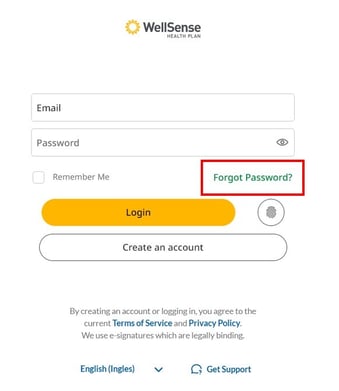
On the login screen, click the 'Forgot Password?' link. From there, you'll enter your email address and a password reset link will be emailed to you.
You have 24/7 access to your digital ID card within the member portal. Just log in to your account and go to your Digital Wallet.
If you need a physical copy of your ID card, follow these steps:
-
Log in to your member portal account at members.wellsense.org.
-
Click on the image of your ID card
-
Click the Submit a request to mail a physical ID card link
The app is coming soon!

Get the app
Stay connected to your health— securely access benefits, claims and digital ID cards at your fingertips.